Usage
What it does
| Step | What Roomtone does | Where |
|---|---|---|
| Measure | Plays level-ramped sweeps through the current CamillaDSP profile, one speaker at a time, at one or five microphone positions. Finds each burst by matched filter, so a noisy room does not hide it. Records the room's noise floor before and after | autocal/ |
| Check | Preflight, noise floor, level ramp and channel identification (catches dead channels and a wrong microphone input) before any real sweep. Hard output cap of -20 dBFS; aborts on microphone clipping or sub distortion (second harmonic above -20 dBc) | autocal/safety.py |
| Analyse | Per-speaker arrival time, level, polarity, bass response and the heights' tone against the bed, with the microphone's calibration file applied | autocal/, tools/ |
| Propose | New delays and trims, polarity flips, a consensus parametric cut below 100 Hz towards a target (the author's deliberate bass hump, drone2), and a tone and level match for the height speakers. Boosts only with --allow-boost. Changes under 0.15 ms or 1 dB are ignored |
autocal/ |
| Apply, safely | Backs up the live config, installs the change, starts a timed trial that reverts by itself unless you press Keep it; Roll back restores the backup | autocal apply, gui/ |
| Show | A local control page (127.0.0.1 only): a 3D view of the room (drag to turn it; 3D, Top and Side presets) with live per-speaker levels, what is playing, CamillaDSP load, and the autocal page with live progress, "move the microphone" prompts and graphs. The same panel is in mpv (press C) | gui/, overlay/ |
| Diagnose | Separate kits for the sub (how low it goes, where it rattles), dialogue (a STIPA-style estimate), early reflections, drift between two playback clocks, and a load and dropout logger for films | tools/, scripts/resource-log |
Running autocal
autocal measures every speaker through the current CamillaDSP profile and proposes a residual correction. It never applies anything by itself.
scripts/autocal check|mic --spectrum|run ...          the same commands with the mic made ready first (MIC set, unmuted, capture level 60 %); use this on the real rig
python3 -m autocal check [--simulate]                 preflight, noise floor, level ramp, channel ID only
python3 -m autocal run --simulate [--mode single|five] [--runs-dir DIR]
python3 -m autocal run [--mode single|five]           real rig (PipeWire), needs the mic
python3 -m autocal report|verify RUN
python3 -m autocal apply RUN [--trial-seconds 60]     backup, install, 60 s trial that reverts unless:
python3 -m autocal keep                               ...you confirm
python3 -m autocal rollback                           restore the latest backup
python3 -m autocal.web                                localhost GUI (separate part)
A --mode five run uses five microphone positions (centre plus four offsets); the program prompts "move the mic" between them, and the delays, trims and bass EQ come from the position means. --seat sets up a multi-seat run instead (name the seats and how much each counts) — see autocal/README.md for the full options.
A FAIL verdict can still be applied with autocal apply --force (or the page's "Apply anyway" confirmation after a warning) — autocal refuses without it. python3 -m autocal mic --spectrum records 15 s of nothing playing and prints the noise floor per octave band, to tell a cycling compressor or fan from electrical hum before a calibration run.
Theatre control: the status and control page (gui/) and the mpv overlay
Roomtone does not apply room corrections through the router — that's autocal's job (above), and only with your sign-off. What gui/ and overlay/ give you is theatre control: a live view of what the rig is doing, and switches for it, that talk to linux-theater-dsp's router (eq / theater-route) and to autocal. Neither page ever applies a correction by itself.
The page follows your computer's light or dark setting; the Theme button in the header (also on the Autocal and Layout pages) cycles Auto, Light and Dark and remembers the choice in that browser, for all three pages.
gui/install-ctld.sh installs theater-ctld as a user service on 127.0.0.1:8765 (needs the router's eq status --json from linux-theater-dsp first; remove undoes it).
Control page (/)
Now-playing, profile and engine, CamillaDSP's live numbers (needs its websocket, -p 1234 -a 127.0.0.1), and buttons for EQ, profile mode, flavours and engine — this is the page that actually drives the router's eq command day to day.
A live sound field shows the level of each output (for the author's layout: FL FR FC LFE SL SR and the two ceiling speakers; your own layout file's speakers otherwise) in a 3D view of a schematic room (drag to turn it; positions are schematic, heights fixed by speaker kind) plus meters, about 20 times a second (/v1/levels, read-only GetPlaybackSignalPeak/Rms). This is the signal level after EQ, not room sound pressure and not object positions — the "loudest" speaker and the glow centre are level-weighted, not a rendered object position.
Localhost only, a token on every action, a fixed action table (no shell, no free-form options). Tests: tests/test_ctld.py.
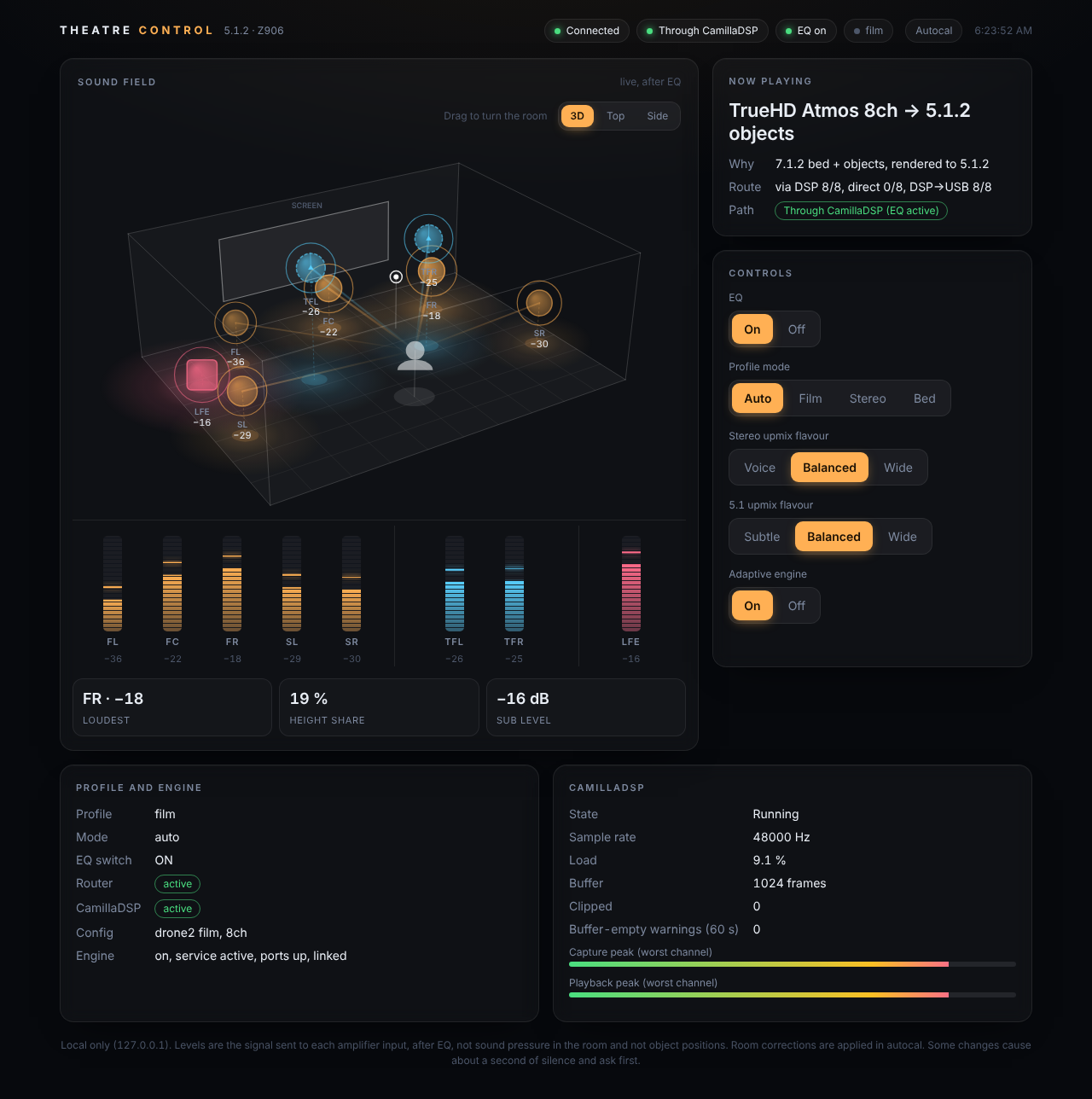
The control page (dark theme; it follows your system theme, so there's a light one too). These screenshots run against a simulated CamillaDSP that generates moving levels, so the numbers and "now playing" text are made up for the picture, not a recording of a real film.
Layout page (/layout)
Choose a preset or edit speakers, map each to an output port, identify a speaker with a quiet tone (at most -40 dBFS, 2 s, that one channel only), preview the plan view, and save with a backup. Same security model as the control page; no shell, no free-form options. Tests: tests/test_ctld_layout.py (fake pw-play and pw-link).
Autocal page (/autocal)
Start a measurement, watch it live (step, progress, position, mic meters, the room's noise floor, the run's console output), answer "move the microphone" with Continue or Stop the run, read the verdict, warnings, and the per-channel table of any past run, and apply a finished run's proposal. It reads runs/ from the checkout gui/install-ctld.sh pointed it at.
It runs the exact same autocal commands you'd type yourself, as a subprocess from a fixed table — no shell, no free-form options. The only variable parts are the run id (YYYYMMDD-HHMMSS) and the runs folder the service computed.
Guardrails:
- One run at a time — also blocked while a run is going in a terminal, or while a trial of an already-applied profile is still pending.
- Anything that plays sound asks first and says what will be played.
- The -20 dBFS level cap and the live safety monitor live inside
autocalitself; the page has no way to change them. - Stop writes
control/abort(the same thing Ctrl-C does in a terminal) and, for a run the page started, follows up with SIGINT after 3 s and SIGTERM after 8 s if it's still alive. - Apply shows what will change first (per-channel delay and trim, extra bass filters, height tone — the run's starting room against the proposed one), the verdict and warnings, and that it starts a timed trial with a backup made first. You then press Keep it or Roll back now, or it reverts on its own. A FAIL verdict needs an explicit "apply anyway (force)" confirmation — same as
autocal apply --force;autocalitself refuses without it. Simulated runs are never applied to the real system. - The service runs with
KillMode=process, so restarting the page doesn't kill a measurement in progress or the watchdog reverting a trial.
Tests: tests/test_ctld.py (a fake autocal records the exact argv).
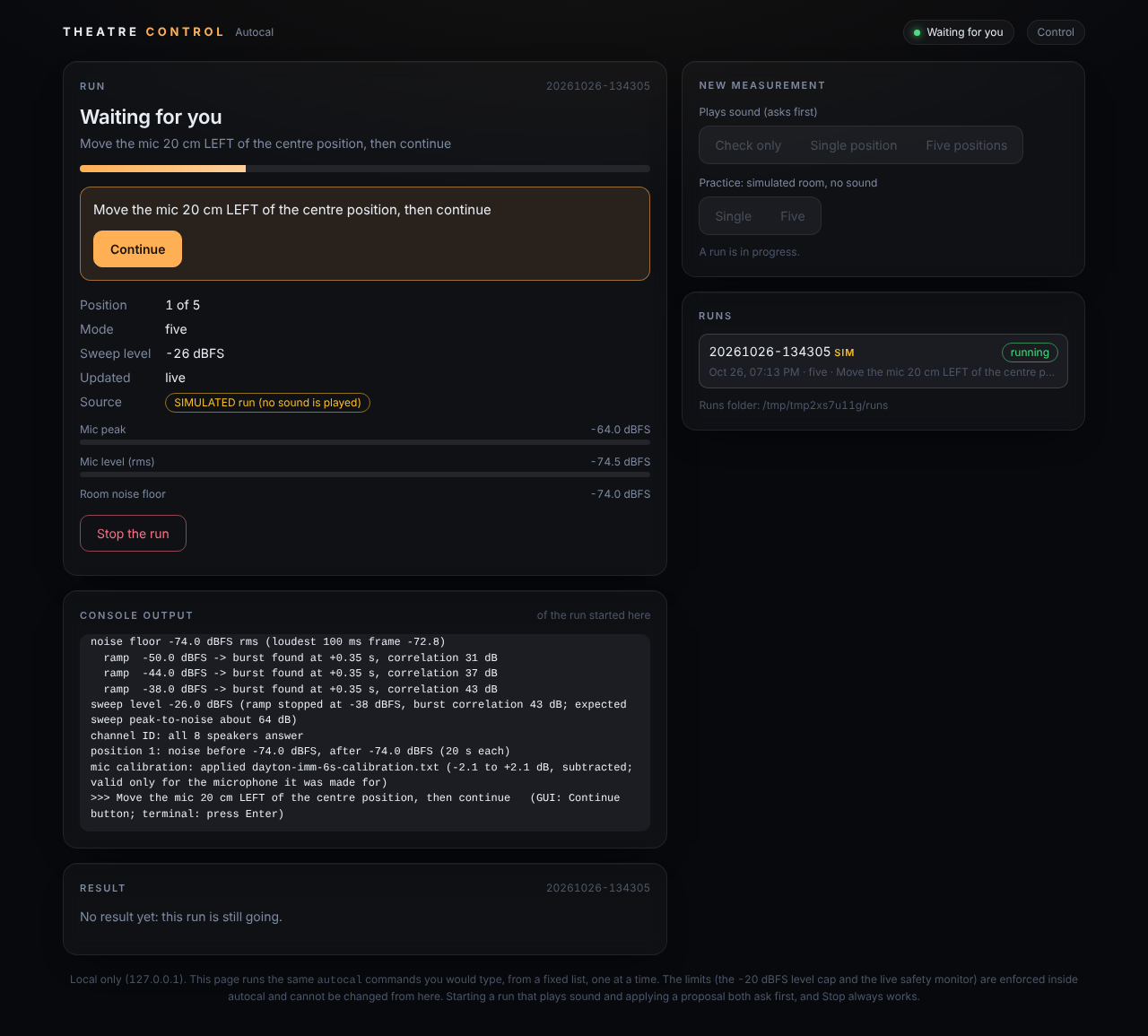
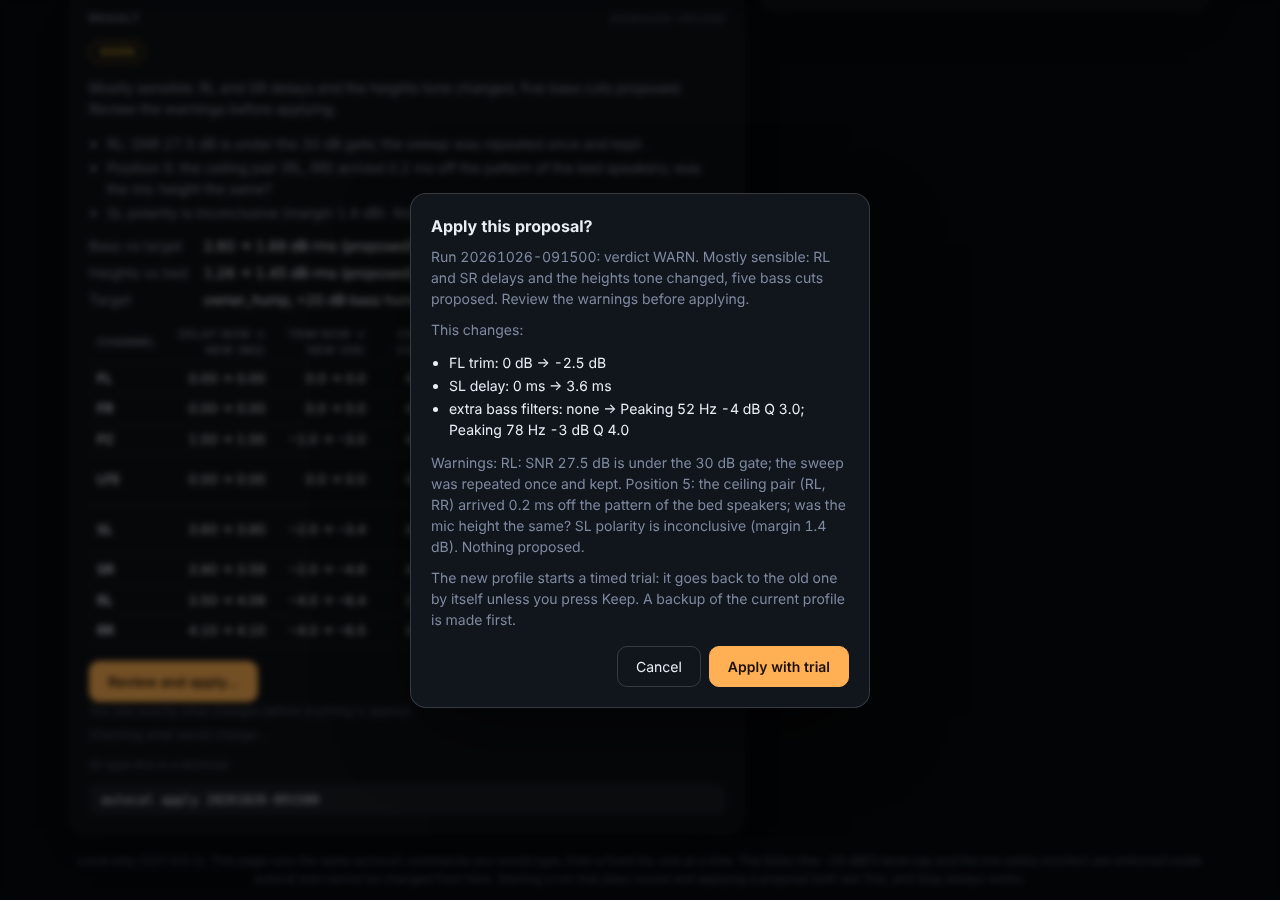
The first screenshot is a real autocal run --simulate driven from the page (no sound played); the second uses a generated result from autocal/web/mock.py, so its numbers are made up.
mpv overlay (overlay/)
overlay/install-theater-status.sh --bindings installs the mpv script and binds the C key. One panel: status first, then a row per setting showing its current value; Enter steps a row, and risky changes ask first. Tests: tests/test_theater_status.py (mocked mpv, needs pip install lupa).
Setting up your own speaker layout
See Speaker layouts for the full reference. In short:
python3 autocal/layout.py --detectlists your interface's output ports (plays nothing) and proposes a preset by port count.python3 autocal/layout.py --detect --device <your sink name> --writewrites that proposal, or use the Layout page athttp://127.0.0.1:8765/layout.python3 autocal/layout.py --validatechecks the file in plain words.- Rebuild the DSP config with
set-eq.py(oreq on), then restart the router andtheater-ctld.
Every preset except the author's own 5.1.2 starts with zero delays, zero trims and no tone filters; run autocal in your room to get proposals.
Diagnostic kits
| Kit | Question it answers |
|---|---|
tools/sweeptest/ |
speaker-by-speaker sweeps with CamillaDSP in the path: level, arrival time, bass management of the heights |
tools/subtest/ |
how low the sub goes and where it rattles (tones, sweeps, a rattle detector) |
tools/dialoguetest/ |
how well speech comes through (a STIPA-style estimate, not a certified STI) |
tools/reflecttest/ |
are the first-reflection panels working (early-reflection analysis, before and after) |
tools/realscenetest/ |
where does a dip in a real film scene come from: bass the room adds, or something else (with a self-check of what the scene can show) |
tools/bartest/ |
the same tests as a 5.1 set for a soundbar, plus a pan ring, to compare against the rig |
tools/drifttest/ |
does a second subwoofer (another clock) stay in phase with the first? Measures the delay between two playback paths over time (ppm drift, jitter, steps) |
tools/miccal.py |
removes the measurement microphone's response from every recording the analysers read |
Each kit's own README.md under tools/<kit>/ has the exact commands and what the output means. The full measurement procedure (equipment, recording levels, what each test is for) is in Measurement method.
Load and dropouts during a film
Run scripts/resource-log in a terminal, start the film, press Ctrl+C at the end (add --gpu-sudo on an Intel GPU, which needs root for its GPU counters and asks for your password once):
scripts/resource-log --label atmos --gpu-sudo
It writes ~/resource-log/<time>-atmos/summary.md (read this first), plus samples.csv, environment.txt, pw-top.log and camilladsp-journal.txt. It only reads /proc, /sys, CamillaDSP's read-only websocket, mpv's IPC socket, journalctl --user, and pw-top, nvidia-smi or intel_gpu_top when present. A source that is not available is reported as "not measured", never as zero.
Microphone calibration
All the analysers read recordings through one function that applies the calibration file in data/mic/ (values subtracted, as REW does; zero-phase, so timing is untouched). The analyser prints mic calibration: applied ... or NOT applied. Use --mic-cal=FILE or MIC_CAL=FILE for another file and --mic-cal=none to switch it off.